
Setting up Fourspriter
Add a reference to the Fourspriter library and the sprite sheet containing all the player walk animations.
#include once "fsp2.1.bas"
#include once "spritesheet.bas"
First off, I need to tell Fourspriter where to get the graphics from; this is done by calling fsp21SetGfxAddress with reference to the spritesheet as a parameter.
fsp21SetGfxAddress (@spritesheet (0))
The Fourspriter library will update the screen itself (when the update function is called), but it needs to know which graphics to use, their color, where to position it, and whether it is active or not.
fsp21SetGfxSprite(3, 0, 1, 2, 3)
fsp21ColourSprite(3, 7, 7, 7, 7)
Here I configure to use the third sprite on the sprite sheet with the color 71 (Ink + Bright*64) for all four 8x8 tiles that make up the sprite (identified as block 0, 1, 2, and 3).
I also need to define where to position the sprite; this is done using fsp21MoveSprite.
fsp21MoveSprite(3, x, y)
fsp21DuplicateCoordinatesSprite(3)
This will move the sprite to the position indicated by the x and y position. fsp21DuplicateCoordinatesSprite() is only necessary to call the first time the sprite is placed on screen; this will correctly set two internal variables that store where the sprite was before moving it.
Finally, I need to activate the sprite using fsp21ActivateSprite and call fsp21InitSprites to capture the background behind each active sprite before animating it.
fsp21ActivateSprite(3)
fsp21InitSprites()
I have placed all of these Fourspriter routines in initScreen(); here is the final code:
Sub initScreen()
    Border 0: Paper 0: Ink 7: Bright 0: Cls
    Print At 23,0;"Q/A/O/P - up/down/left/right"
    Poke uInteger 23675, @udg (0)

    'Setup Fourspriter
    fsp21SetGfxAddress(@spritesheet (0))
    fsp21SetGfxSprite(3, 0, 1, 2, 3)
    fsp21ColourSprite(3, 7, 7, 7, 7)
    fsp21MoveSprite(3, x, y)
    fsp21DuplicateCoordinatesSprite(3)
    fsp21ActivateSprite(3)
    fsp21InitSprites()

    updateScore(0)
    generateLimes(5)
End Sub
One last thing is to replace the “A” character with the new sprite in the main game loop.
Do
    Asm
        halt
        halt
    End Asm

    movePlayer()

    'Draw Player
    fsp21MoveSprite(3, x, y)
    fsp21UpdateSprites()
Loop
When compiling and running the code in the emulator, I can now see a graphical representation of Awakeman, instead of the “A” character previously used, and I can move the player character around on the screen as before.
However, something isn’t quite right. When the player passes the limes on screen, they are not being “picked up” although a new lime is generated and the score is increased by one, which only happens when the player passes the lime in the top/left corner of the sprite. In addition the “Score” counter is now in green (Ink 4) and the player can move off the screen to right. The latter is easily fixed by adding Ink 7 to the updateScore sub routine and have the player stop when 1 < x < 30 (instead of 0 and 31). To fix the former, I need to extend the collision detection.
Originally, the player was only represented by a single 8x8 character tile, with Fourspriter the player is now four 8x8 tiles, which combined make up a 16x16 sprite. Here is the revised collision detection, where I check for limes in every four corners of the character.
If limes(y,x) = 1 Then eatLimeAt(y,x)
If limes(y+1,x) = 1 Then eatLimeAt(y+1,x)
If limes(y,x+1) = 1 Then eatLimeAt(y,x+1)
If limes(y+1,x+1) = 1 Then eatLimeAt(y+1,x+1)
OK great, I got Fourspriter up-and-running and the gameplay is still intact, now it is time to animate when moving the player around the screen.
Animating Awakeman
Adding animation to the prototype is fairly simple using the Fourspriter library. It is simply a matter of setting the correct sprites using fsp21SetGfxSprite based on the current direction and animation cycle.
First off, I’ve created two variables, one to represent the current animation cycle (or step) and one to represent which direction the player is facing.
Dim pStep,pFacing as Byte
Next, I’ve created a sub routine that increments the step counter and loops back to zero when it reaches the end of the animation cycle.
Sub doStep ()
	pStep = pStep + 1: If pStep = 4 Then pStep = 0: End If
End Sub
The player should only animate while moving, so I call doStep() as part of the movement handling. At the same time, I also update pFacing so that the correct set of frames is used for up, down, left, and right.
Let k$ = INKEY$
If k$ = "q" Then Let vy=-1:pFacing=16
If k$ = "a" Then Let vy=1:pFacing=0
If k$ = "o" Then Let vx=-1:pFacing=48
If k$ = "p" Then Let vx=1:pFacing=32

If vx <> 0 OR vy <> 0 Then
    doStep()
    ' move player and check collisions
End If
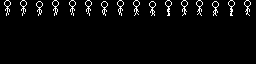
Each direction on the sprite sheet has three animation frames. I use pFacing as the offset into the sprite sheet and then select the correct frame based on pStep.
Sub updatesFrame()
   If pStep = 0 Then
      fsp21SetGfxSprite(3, pFacing, pFacing + 1, pFacing + 2, pFacing + 3)
   ElseIf pStep = 1 Or pStep = 3 Then
      fsp21SetGfxSprite(3, pFacing + 4, pFacing + 5, pFacing + 6, pFacing + 7)
   Else
      fsp21SetGfxSprite(3, pFacing + 8, pFacing + 9, pFacing + 10, pFacing + 11)
   End If
End Sub
With that in place, the main game loop only needs one extra step before drawing the player sprite.
Do
    Asm
        halt
        halt
    End Asm

    movePlayer()

    updatesFrame()
    fsp21MoveSprite(3, pX, pY)
    fsp21UpdateSprites()
Loop
When I compile and run this version in the emulator, Awakeman is no longer just a static graphic moving around the screen. The player character now animates correctly while walking, and the game starts to feel much more like an actual game than a prototype.
There are still plenty of things I could improve from here, but at this point I have a playable game with working graphics, animation, score keeping, and collision detection.
In the next post, I will try to get it running on actual hardware.